Blog · November 6, 2026 · 8 min read
A Journal App for Mac
WOYM on macOS: a private diary with a sidebar, keyboard shortcuts, your whole year in Memories, habits, Touch ID and sync with your iPhone.
Most journaling happens on a phone: a few lines in bed, a photo from the day, a mood tapped in before sleep. But the long entries, the ones where you actually work something out, come easier on a keyboard. That’s why WOYM now has a real journal app for Mac, not an iPad app stretched across a big screen. It has a sidebar, a menu bar, keyboard shortcuts, right-click menus and a reading pane, like the Mac apps you already use.
This post shows what the Mac app looks like, what’s free, how it keeps your diary private, and how it compares with the other journal and diary apps for macOS. I make WOYM, so read the comparison with that in mind.
What to look for in a journal app for Mac
A good digital journal on a Mac is less about features than about friction. Before you pick one, check that it does these:
- Opens to a blank page fast. One shortcut from anywhere, so the thought doesn’t leave while you look for the button.
- Uses the big screen. A list beside the entry you’re reading, and room for photos next to your words instead of on top of them.
- Finds anything. Search that gets to a word you wrote last spring in seconds, and narrows by mood, tag or dates.
- Stays private. A lock (Touch ID on a MacBook) and, if it syncs, encryption that keeps the company out of your diary.
- Works with your phone. A line written on the bus should be there when you open your laptop.
- Runs on your Mac. Apple’s own Journal app only came to the Mac with macOS Tahoe 26. Plenty of good MacBooks can’t run it.
A tour of WOYM on the Mac
Today
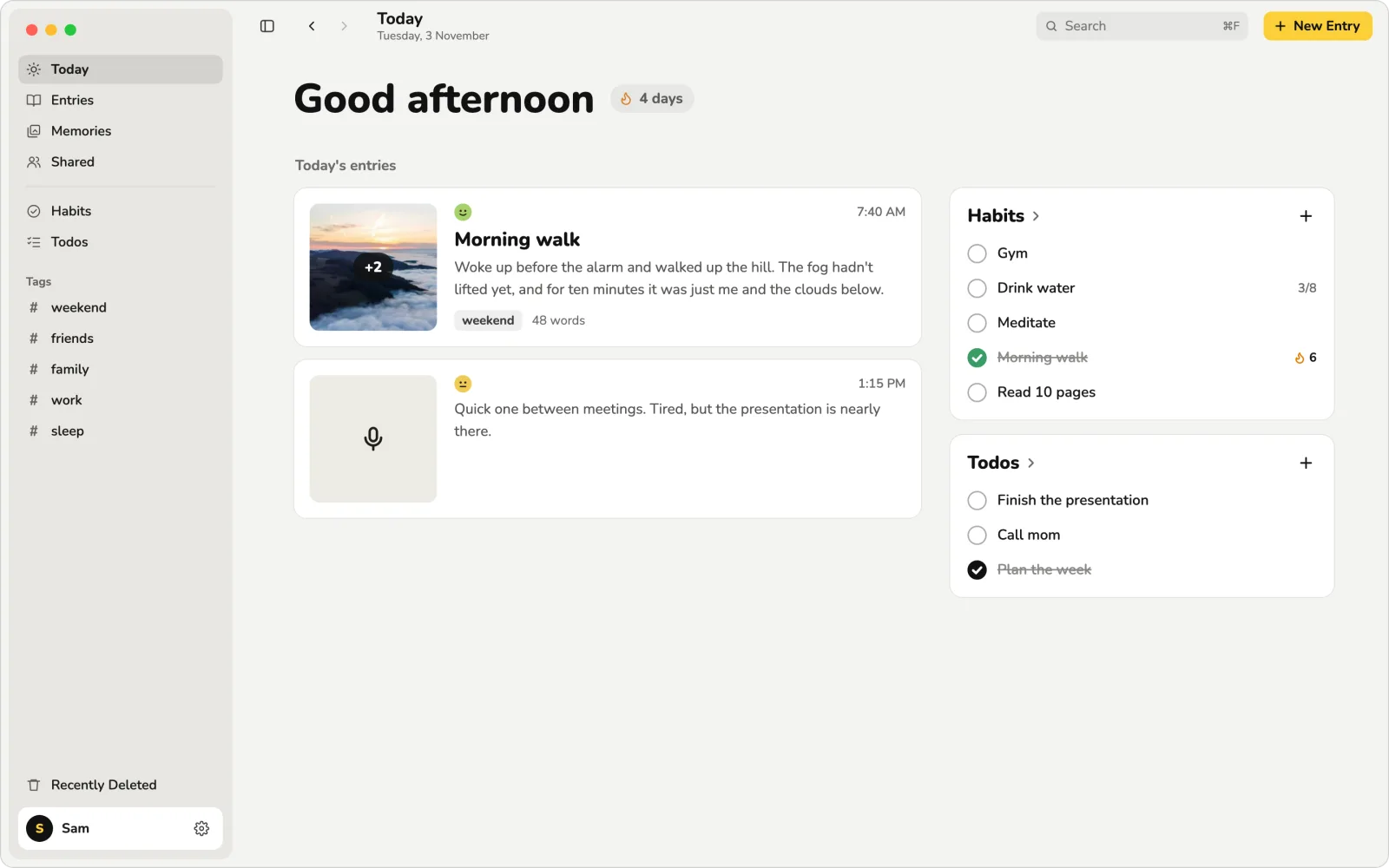
WOYM opens on Today: a greeting, your writing streak, the entries you wrote today with their first photo, mood, tags and word count, and your habits and todos beside them. The sidebar has everything else: Today, Entries, Memories and Shared, then Habits and Todos, your tags, and Recently Deleted for anything you didn’t mean to delete.
Writing an entry
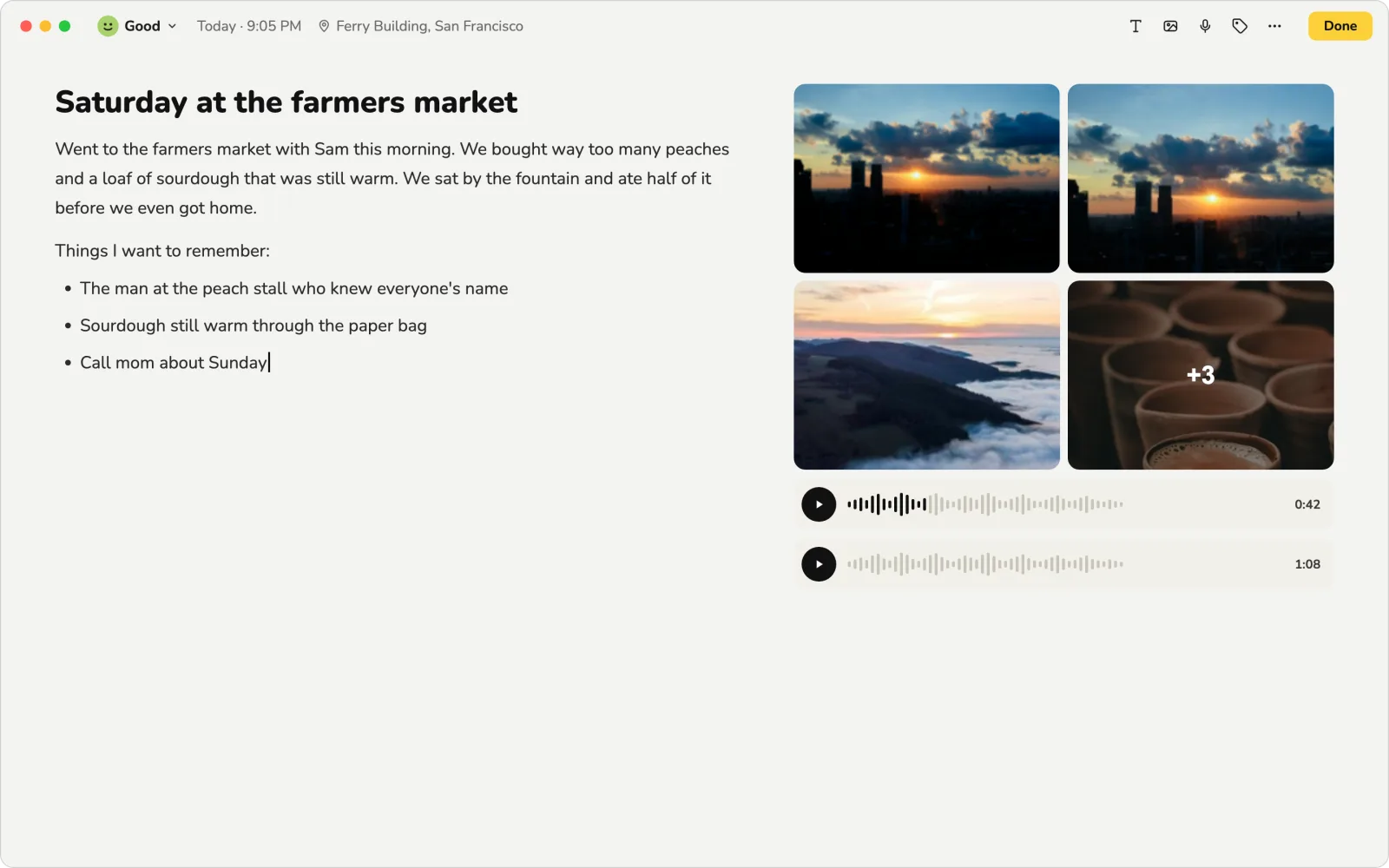
Press ⌘N from anywhere and start typing; the first line is the title. Your mood, the time and the place sit in the top bar with the tools: text formatting, photos and videos, voice notes and tags. Photos and voice notes go in a column to the right of your words, so a long entry stays easy to read. Spelling is checked as you type, and ⌘+ and ⌘− make the text bigger or smaller.
If you’d rather talk than type, Premium adds dictation that writes as you speak, in English, Hindi or a mix of both. Every new entry starts with a morning or evening question you can answer or delete, for the days when nothing comes. There are more in our journal prompts.
Entries and search
Entries lists everything you’ve written under a heading for each month, with the day’s date beside its first entry, a dot for its mood and its first photo at the right. Click one and it opens beside the list to read; double-click to edit. Right-click for Edit, Share, Export and Delete.
⌘F searches every word in your journal, including the words on pages you wrote by hand on an iPad or iPhone. Mood, Tags and Date range narrow it down, the words you searched for are marked in yellow in each result, and ↑ and ↓ step through them.
Memories
Memories shows your whole year, a row for each month, so you can see which weeks you wrote and which you didn’t. Click a day to read it. The map puts each entry where you wrote it, with the latest photo from each place; zoom with a pinch or the scroll wheel. It turns a diary into something you actually look back on.
Habits and todos
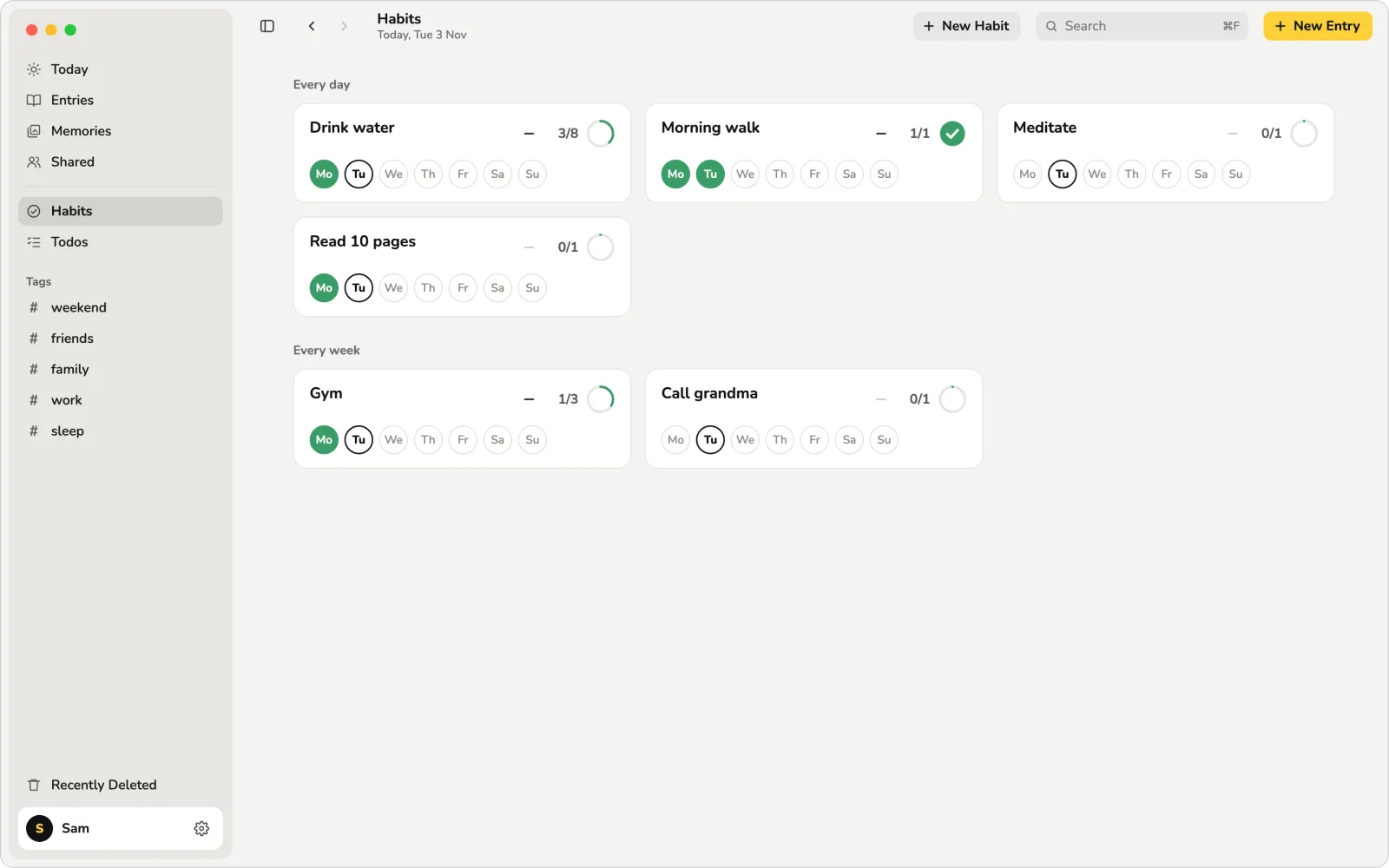
Daily and weekly habits have rings that fill as you count them and a streak for each, and todos can have a reminder. They’re on Today too, so your journal and your list for the day are one window, not two apps.
Sharing one entry
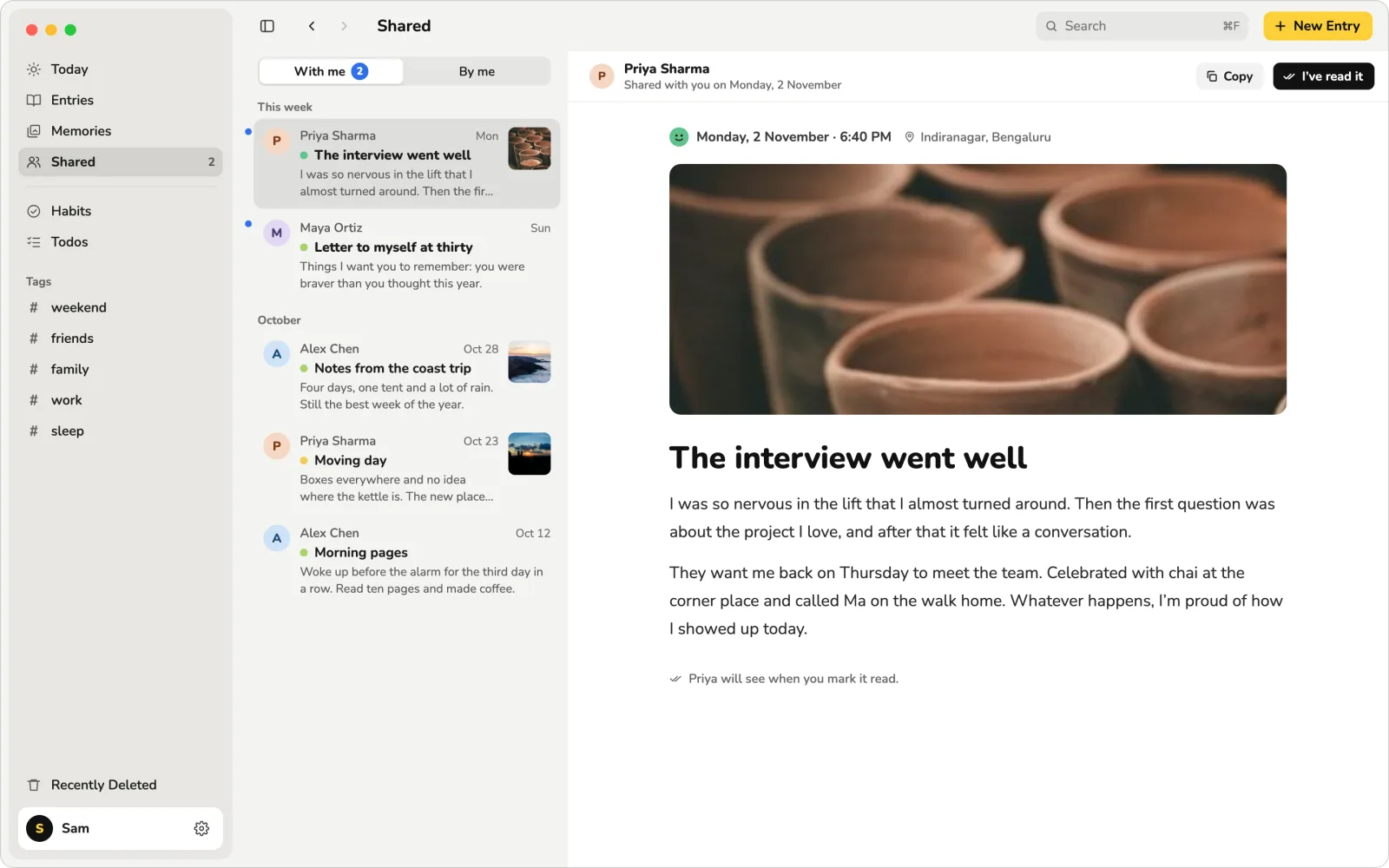
Sometimes one entry is worth showing someone: a letter to a friend, a trip you took together. WOYM shares that one entry, never the whole journal. Shared lists what friends shared with you and what you shared, and they can see when you’ve read it. Sharing is part of Premium.
Your Journal, on Your Mac
Free, with unlimited entries and no account. For macOS 12 and later, and on iPhone and iPad.
A private diary on your Mac
You don’t need an account to start. On the free plan your journal stays on your Mac and never leaves it. Turn on App Lock in Settings and WOYM opens only with Touch ID or your Mac’s password, so a laptop left open on the table doesn’t mean a read diary.
There are no ads, we don’t sell data, and your entries aren’t read by us or used to train AI. If you sync with Premium, you can turn on end-to-end encryption: your entries, photos, voice notes and pages are encrypted on your devices before they leave, with a key only your devices hold, so we store them but can’t read them. I wrote up how the encryption works, for anyone who wants to check.
One journal on your Mac, iPhone and iPad
WOYM is also on iPhone and iPad, and in any browser at woym.app. With Premium, your journal backs up and syncs between all of them: write a few lines on your phone at lunch, add the photos from your camera roll, and read it all on your MacBook in the evening. If you already have Premium on your iPhone, sign in on the Mac with the same account. Without Premium, each device keeps its own journal.
Coming from somewhere else? WOYM imports your Apple Journal export for free, and with Premium your Day One journal, or Notion and Obsidian notes. Leaving is just as easy: export any entry from its menu.
WOYM and the other journal apps for Mac
There’s no single best journal app for Mac; there’s the one that fits how you write. Here’s the honest short version:
| App | Price | On the Mac | Worth knowing |
|---|---|---|---|
| WOYM | Free. Premium is optional | A Mac app for macOS 12 or later | Unlimited entries, photos and voice notes free, with no account. Sync, the web version, encryption and dictation with Premium. On Windows too. |
| Apple Journal | Free | Built in, from macOS Tahoe 26 | Syncs through iCloud and suggests moments from your photos and places. Apple devices only. |
| Day One | Basic is free; Silver $49.99 a year; Gold $74.99 | A Mac app | The most polished paid option, on every platform. The free plan is one device; sync needs Silver. |
| Diarium | A one-time purchase per platform | A Mac app | No subscription, and on Windows too. You buy it again for each platform. |
| Apple Notes, Obsidian | Free | Mac apps | Great for notes, but not built for a diary: no mood, no prompts, no memories. |
If every device you own is made by Apple and your Mac runs macOS Tahoe 26, Apple Journal is free and already there. If you want AI help, Day One is worth its price. If you want a free Mac diary with your habits, your year in Memories and an older Mac welcome, that’s WOYM. For more detail, see Apple Journal vs Day One and the best journal and diary apps. Prices are from each app’s own pages in November 2026.
How I built it
WOYM is one Flutter codebase for iPhone, iPad, Android and the Mac. The easy version of a Mac app would have been the iPad layout in a window. It works, but it feels wrong: big touch targets, a tab bar at the bottom, nothing on the menu bar. So the Mac got its own shell, designed screen by screen before any code: the sidebar, a toolbar with back and forward, lists that pick a row as the mouse button goes down (as Mail does), hover states, right-click menus and a reading pane.
The menu bar has the shortcuts you’d expect: ⌘N for a new entry, ⌘F to search, ⌘, for Settings, ⌘1 to ⌘4 for Today, Entries, Memories and Shared, and ⌘[ and ⌘] to go back and forward. The native parts the iPhone app had were ported to AppKit: the sounds, encoding voice notes, and the Memories map in Apple Maps. It comes from the Mac App Store and updates with your other apps, and Premium bought on your iPhone works on your Mac too.
Start journaling on your Mac
- Get WOYM on the Mac App Store. It’s free and needs macOS 12 Monterey or later.
- Open WOYM from Launchpad or your Applications folder.
- Press ⌘N and write a few lines about your day. That’s the whole habit.
Writing at the same time each day helps, and so does keeping it short on busy days. If you’re new to it, read how to start a journal.
Questions people ask
What is the best journal app for Mac?
It depends on how you write. Apple Journal is free and built in from macOS Tahoe 26. Day One is the most polished paid option and works on every platform. WOYM is free with unlimited entries, runs on macOS 12 and later, and syncs with your iPhone and iPad with Premium.
Is there a free journal app for Mac?
Yes. WOYM for Mac is free: unlimited entries with photos, videos and voice notes, a mood for each entry, habits, todos, search, tags and App Lock, with no account. Apple Journal is also free on Macs running macOS Tahoe 26 or later.
Is there a diary app for Mac with a lock?
WOYM has App Lock built in: turn it on in Settings and the diary opens only with Touch ID or your Mac's password.
Is Apple Journal available on Mac?
Yes, since macOS Tahoe 26. On older versions of macOS it isn't available; WOYM runs on macOS 12 Monterey and later.
Can I sync my journal between iPhone and Mac?
Yes, with WOYM Premium your journal backs up and syncs between your Mac, iPhone, iPad and the web. Sign in with the same account on each device.
Is my journal private on the Mac?
On the free plan your journal stays on your Mac. With Premium sync you can turn on end-to-end encryption, so your entries, photos and voice notes are encrypted on your devices and only they can read them.
Is there a journal app for Windows too?
Yes. WOYM is free on the Microsoft Store for Windows 10 and 11, and with Premium your journal syncs between your Mac, your Windows PC and your phone. On any other computer, Premium includes the web version at woym.app.