Blog · November 27, 2026 · 9 min read
The Best Journal App for Windows
Ten ways to keep a diary on a Windows PC, what each costs, and the catch. Plus WOYM, a free journal app from the Microsoft Store.
The best journal app for Windows depends on how you write. For a private diary that’s free, has no account and also runs on your phone, I’d pick WOYM, which I make, so weigh that. For a one-time purchase there’s Diarium. For a polished paid journal on every platform there’s Day One. Apple Journal isn’t on Windows at all.
Windows has fewer good native journal apps than the Mac or an iPhone, so this post lists the real options: what each costs, what you give up, and the catch. If you came here looking for Day One for Windows or Apple Journal for Windows, the answers are in the comparison below.
What to look for in a journal app for Windows
A diary you open every day needs to be quick and trustworthy. Before you pick one, check:
- A real Windows app. Installed from the Microsoft Store, with window resizing, keyboard shortcuts and a dark mode. Not only a website in a tab.
- What the free plan leaves out. A cap on entries, photos or devices shows up a month in, after you’ve written a lot.
- Your phone. Most people journal on the phone and on a PC. If the app isn’t on both, you’ll end up with two journals.
- Privacy. A lock (Windows Hello is the natural one) and, if it syncs, encryption that keeps the company out of your diary.
- Getting out. Export that works without the app, so a journal isn’t trapped in one program.
- A price you can read. Subscription, one-time purchase or free, and whether you pay again for each platform.
A tour of WOYM, a free journal app for Windows
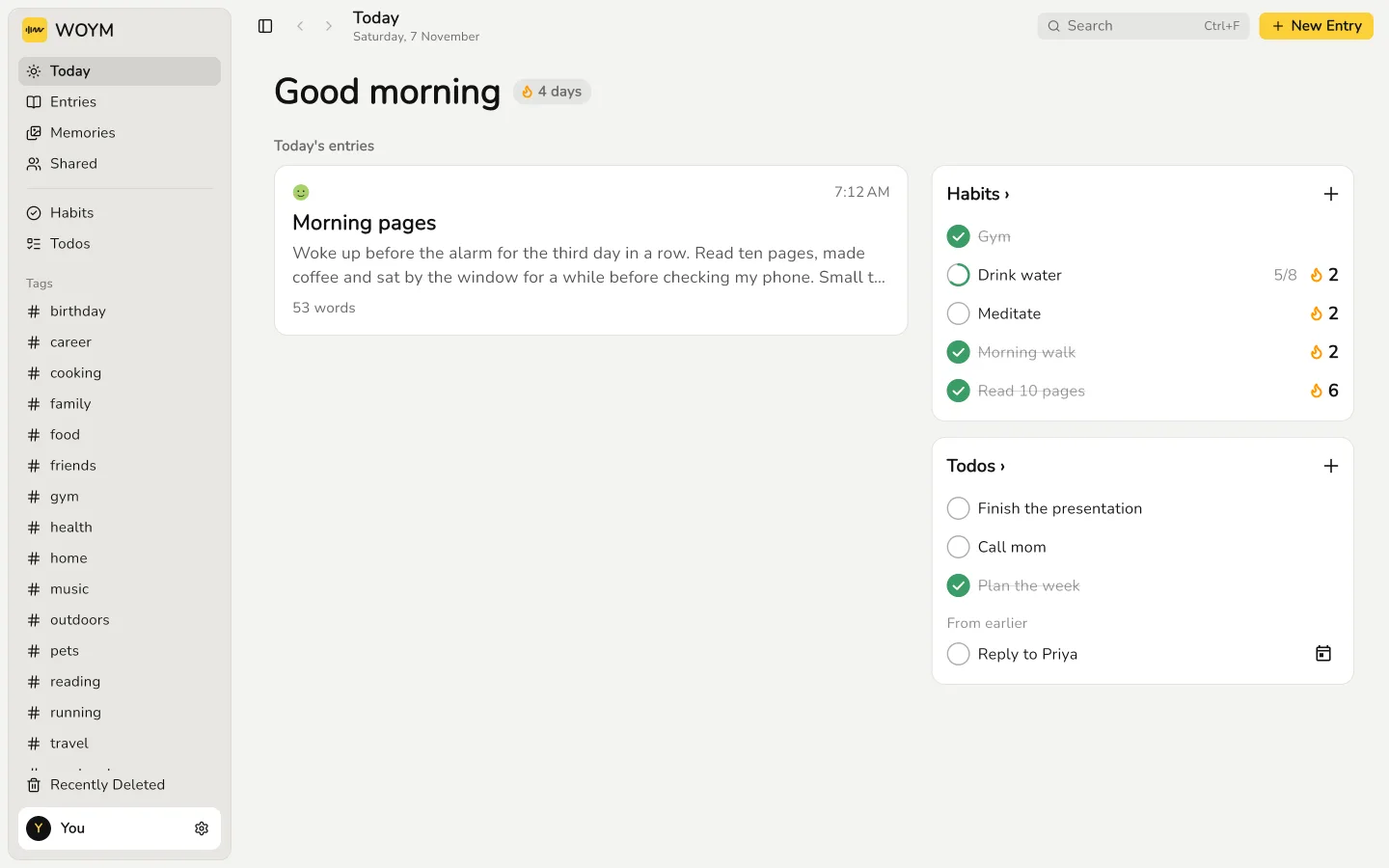
WOYM for Windows 10 and 11 is the same app as on the Mac, built for a PC: a sidebar, a toolbar with back and forward, a search box, and shortcuts that use Ctrl where the Mac uses ⌘.
Today
It opens on Today: a greeting, the entries you wrote today with their mood, time and word count, and your habits and todos next to them. The sidebar holds Today, Entries, Memories and Shared, then Habits and Todos, your tags and Recently Deleted, for anything you didn’t mean to delete.
Writing an entry
Press Ctrl+N and start typing; the first line is the title. The top bar has your mood, the date and time, a word count and the tools: text formatting, photos and videos, and voice notes. Photos sit in a column to the right of your words, so a long entry stays easy to read. Every new entry starts with a prompt you can answer or delete, for the days when nothing comes. There are more in our journal prompts.
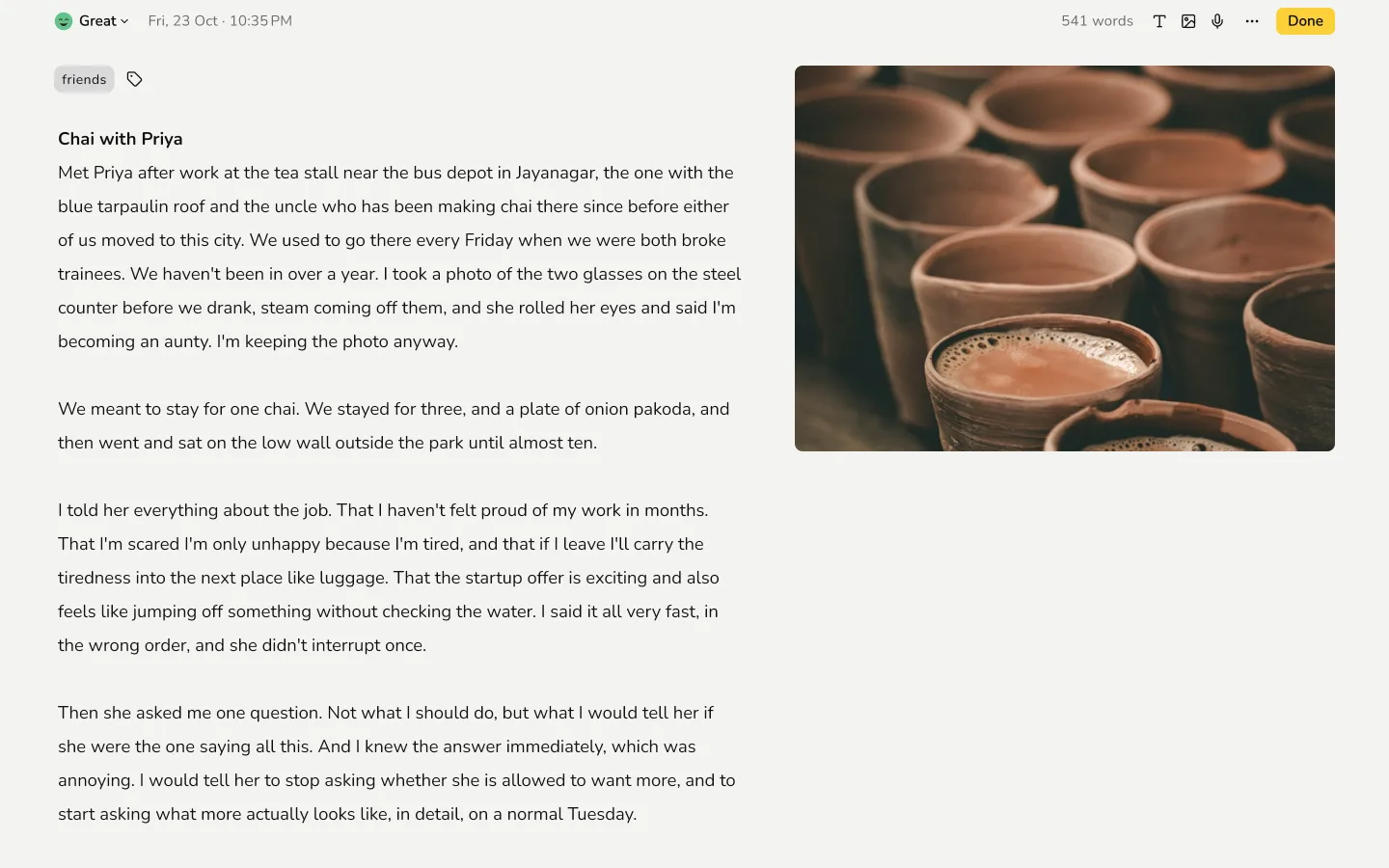
Premium adds dictation that writes as you talk, in English, Hindi or a mix of both, for up to an hour. There’s no camera button on Windows yet, so add photos you already have on the PC.
Entries and search
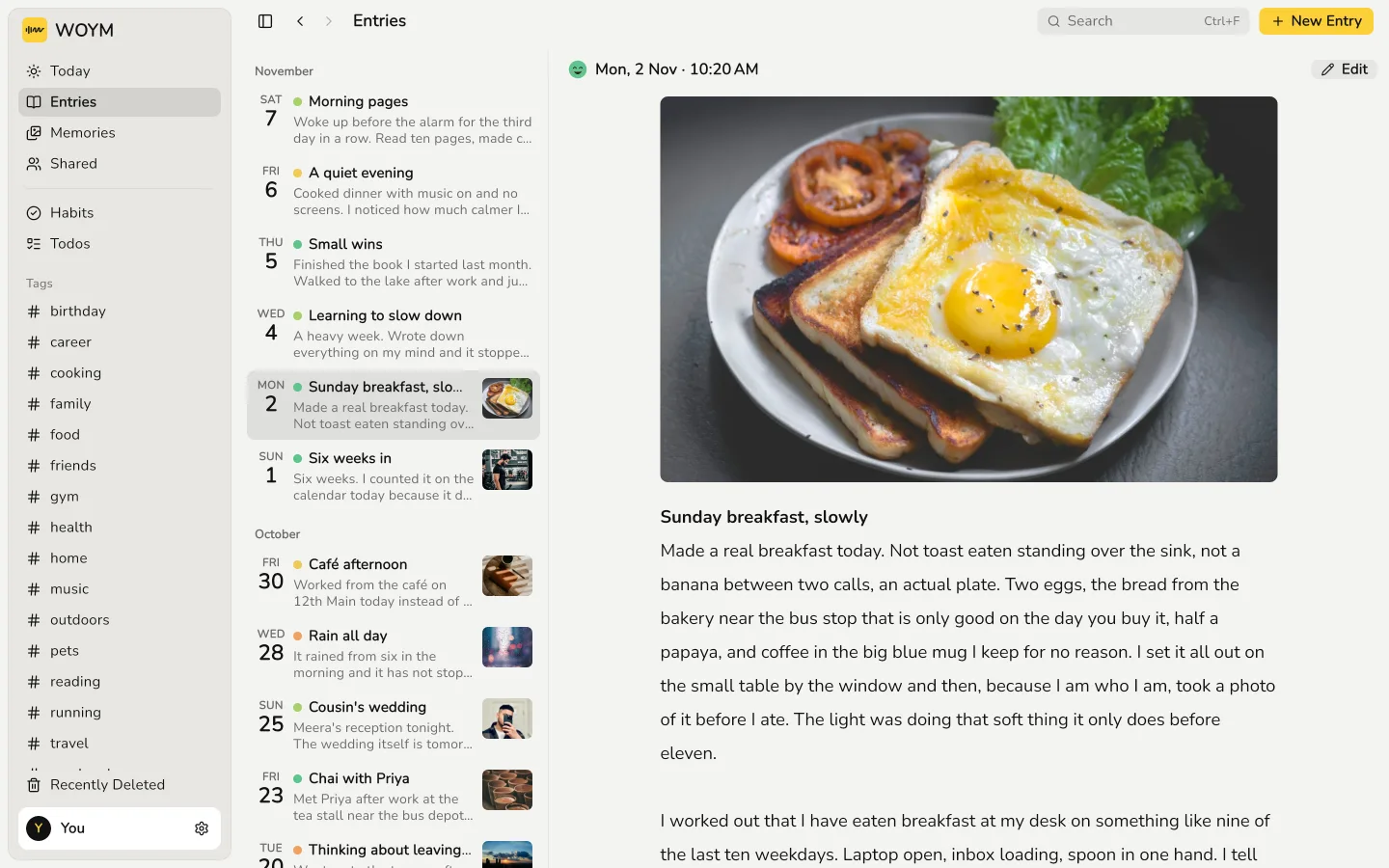
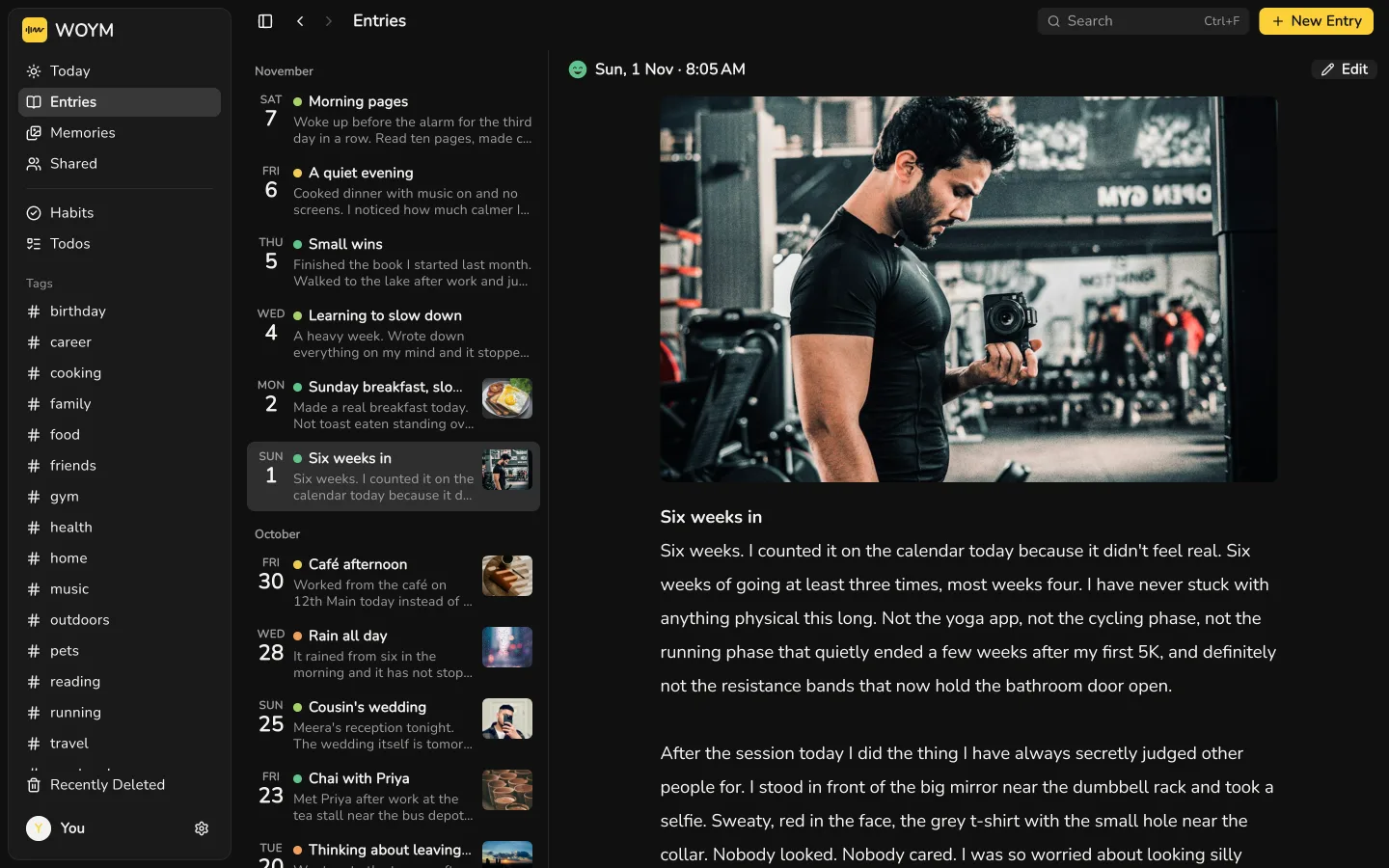
Entries lists everything you’ve written under a heading for each month, with the day beside each one, a dot for its mood and its first photo at the right. Click one and it opens beside the list to read; press Edit to change it. Ctrl+F searches every word in your journal, and you can narrow it by mood, tag or dates.
Memories
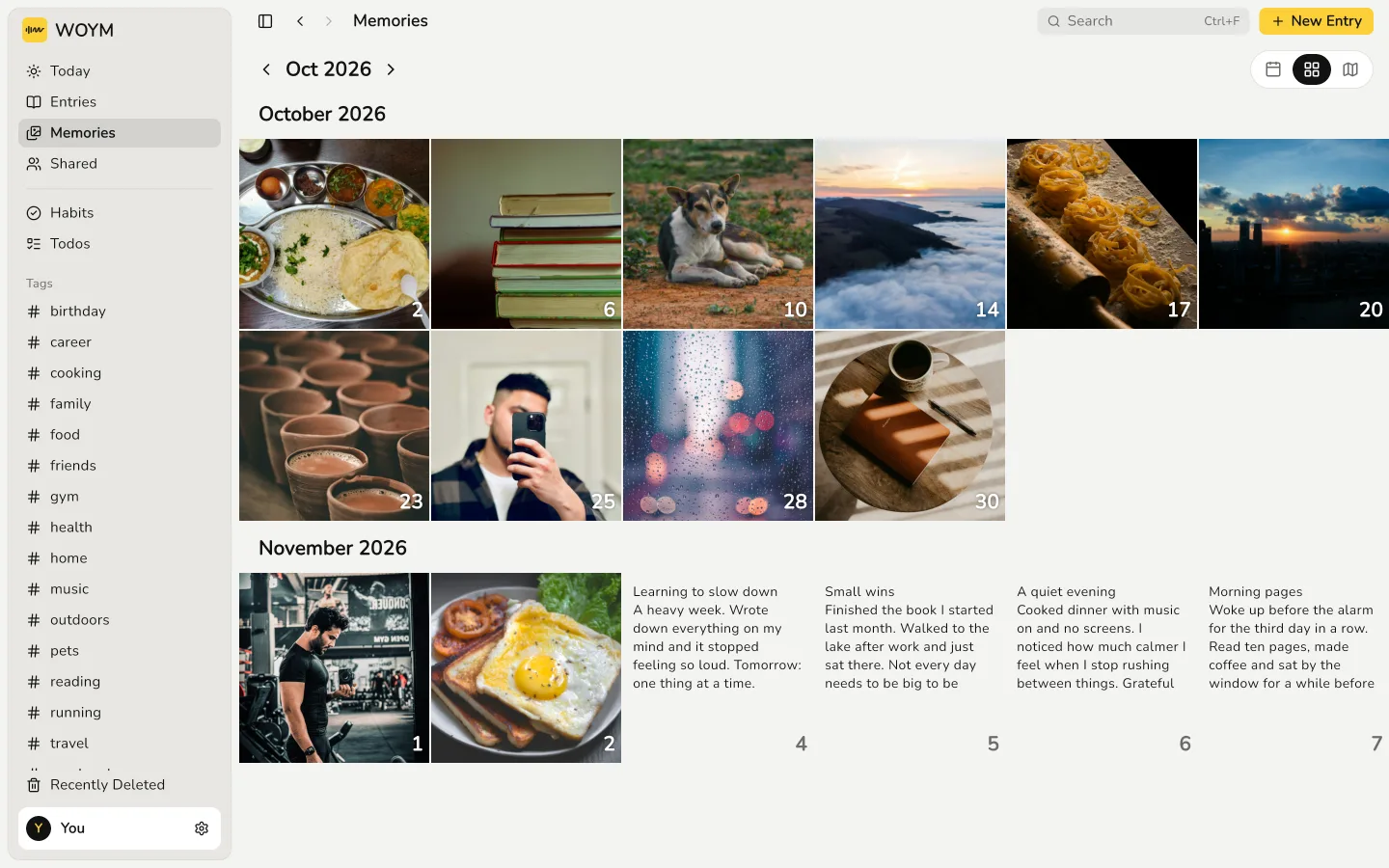
Memories turns the journal into something you look back on. Switch between a calendar, a grid of your photos by month, and a map of where you wrote each entry. A day without a photo shows its first words instead, so no day looks empty.
Habits and todos
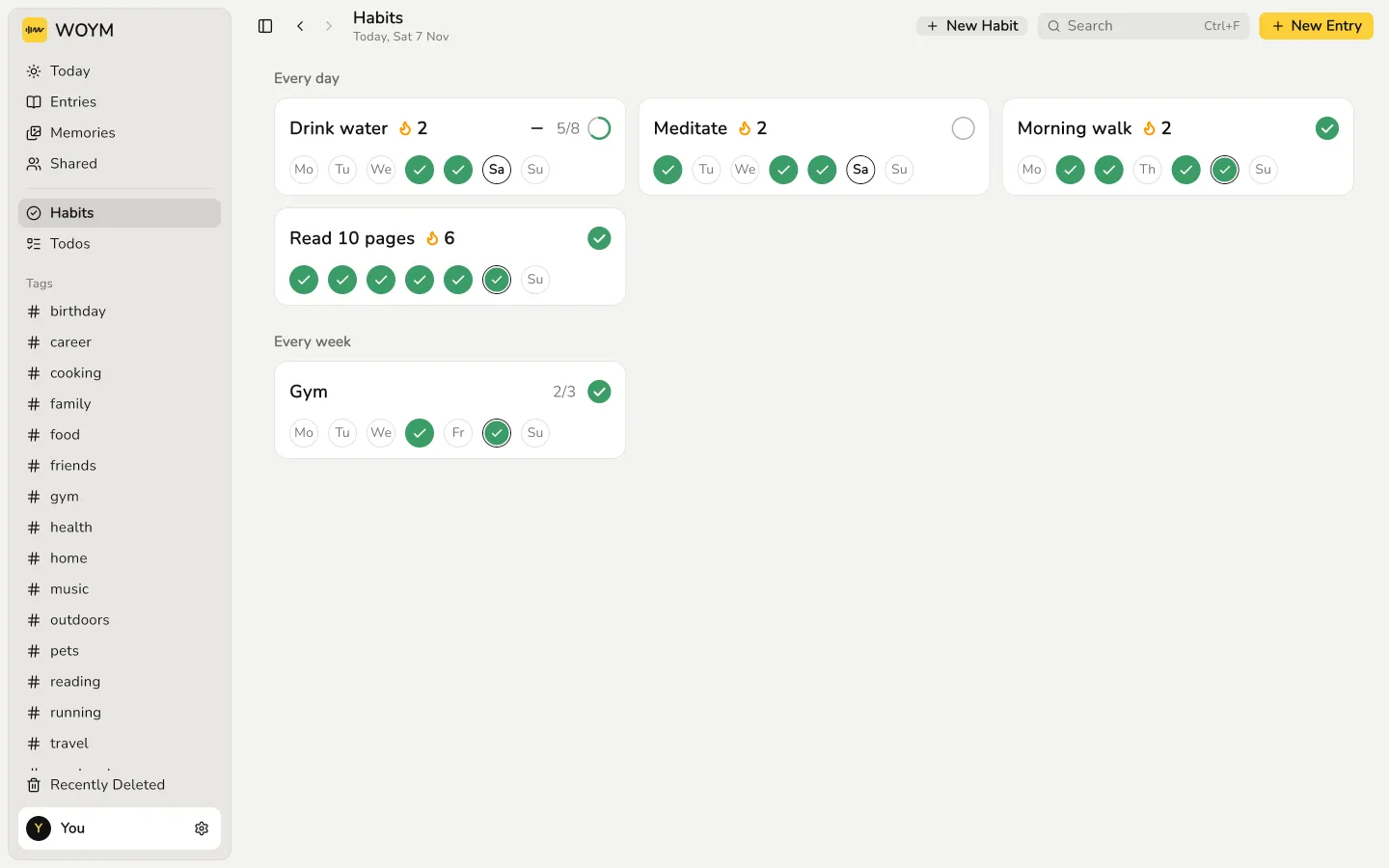
Daily and weekly habits show the week’s days under each one, and todos sit beside them on Today, so your diary and your list for the day are one window, not two apps.
Dark mode
For late-night entries WOYM has a dark theme, so the screen isn’t a lamp in a dark room.
Your Journal, on Your PC
Free from the Microsoft Store, with unlimited entries and no account. For Windows 10 and 11, and on your phone.
A private diary on your PC
You don’t need an account to start. On the free plan your journal stays on your PC and never leaves it. Turn on App Lock in Settings and WOYM opens only with Windows Hello: your face, fingerprint or PIN. So a laptop left open on a desk doesn’t mean a read diary.
There are no ads, we don’t sell data, and your entries aren’t read by us or used to train AI. If you sync with Premium, you can turn on end-to-end encryption: your entries and photos are encrypted on your devices before they leave, with a key only your devices hold, so we store them but can’t read them. I wrote up how the encryption works, for anyone who wants to check. The longer version of what to ask any online diary is in what to check before you trust an online journal.
One journal on your PC and your phone
WOYM is also on iPad, the Mac, the Apple Watch and Android, and in any browser at woym.app. With Premium, your journal backs up and syncs between them: write a few lines on your phone at lunch, and read and extend them on your PC in the evening. Without Premium, each device keeps its own journal.
Two things to know about the Windows app today. Premium is bought on woym.app, for your account, and the app tells you how; it turns on when you sign in. And reminders, notifications and writing by hand aren’t on Windows yet. Reminders work on your phone, and handwriting works on an iPad, iPhone or Android phone; pages written there open on the PC to read and search. Moving in from another app is done on woym.app: Day One, Notion and Obsidian imports are part of Premium, and Apple Journal has its own import guide. Leaving is simple too: export any entry or your whole journal as a ZIP.
The best journal apps for Windows 11, compared
There’s no single best journal app for Windows 11. There’s the one that matches how you write and pay. Here’s the honest short version:
| App | Price | On Windows | Worth knowing |
|---|---|---|---|
| WOYM | Free. Premium is $14.99 a year in the US, optional | A Windows 10 and 11 app from the Microsoft Store | Unlimited entries, photos and voice notes free, no account. Sync, encryption and the web version need Premium. Also on iPhone, iPad, Mac and Android. |
| Day One | Basic is free; Silver $49.99 a year; Gold $74.99 | A Microsoft Store app that loads Day One's web app | The most polished paid journal. On Windows it follows the web app, which doesn't have everything the Mac and iPhone apps do, such as the map view. |
| Diarium | A one-time purchase, around $20 and often discounted | A native Windows app | No subscription, and strong on Windows. You buy it again on each platform, and there's no web version. |
| Journey | Membership $49.99 a year; limited free plan | A Windows app from the Microsoft Store | Every platform, with map and calendar views. The free plan is small, and sync is paid. |
| Microsoft Journal | Free | A Microsoft Store app for Windows 10 and 11 | A pen-first notebook for ink and PDFs, great on a touchscreen. Not a diary: no entries by date, moods or habits. |
| OneNote | Free | Built into Windows and in the Store | Good if you already live in Microsoft 365. Flexible pages, but no mood, prompts or Memories, and nothing nudging you to write. |
| Penzu | Free plan; Pro is paid | In the browser | A simple web diary. Encryption and PDF export are on the paid plan. |
| RedNotebook | Free and open source | A desktop app, with a Windows installer | A plain, local, no-account diary with a calendar. No phone app and no sync. |
| Obsidian, Notion | Free for personal use | Windows apps | Great notes tools that can hold a journal. You build the diary yourself, and photos and phone capture take setting up. |
| Apple Journal | Free | Not available | Apple devices only: iPhone, and iPad and Mac with the 26 releases. Nothing for Windows or the web. |
Day One for Windows. Day One does have a Windows app, from the Microsoft Store. It loads Day One’s web app, saves entries locally first, and Day One says Windows access is currently free and doesn’t count against your device limit. It isn’t the full Mac or iPhone app, though. Apple Journal for Windows doesn’t exist: it’s built into Apple’s devices, so on a PC your options are the apps above, or exporting your Apple Journal entries and importing them into WOYM.
If you want to pay once and live on the PC, Diarium is hard to beat. If you want a pen-first notebook, try Microsoft Journal. If you want a free diary that also lives on your phone, with habits, moods and a year of Memories, that’s WOYM. More on how the paid ones compare in Apple Journal vs Day One, WOYM vs the others and the best journal and diary apps. Prices are from each app’s pages in November 2026 and change, so check the Store before you buy.
Is there a free journal app for Windows?
Yes, several. WOYM’s free plan has no cap: unlimited entries with photos, videos and voice notes, a mood on each, habits, todos, search, tags and App Lock, with no account. It’s the whole journal, kept on your PC. Premium is for the parts that need a server: sync and backup, the web version, end-to-end encryption, dictation, sharing an entry and importing from other apps. In the US it’s $14.99 a year or $1.99 a month, and prices for your country are on the pricing section of the home page. There’s more in the free diary app guide.
Start journaling on Windows
- Get WOYM from the Microsoft Store. It’s free, for Windows 10 and 11.
- Open WOYM from the Start menu.
- Press Ctrl+N and write a few lines about your day. That’s the whole habit.
Writing at the same time each day helps, and so does keeping it short on busy days. If you’re new to it, read how to start a journal, or try a gratitude journal. Kept for a different reason? WOYM suits a dream journal and a travel journal too.
WOYM on your other devices: Mac, iPad, Apple Watch and Android.
Questions people ask
What is the best journal app for Windows 11?
It depends on how you write and pay. Diarium is a native Windows app you buy once. Day One is the most polished paid journal and has a Windows app that loads its web app. WOYM is free with unlimited entries and also runs on your phone, Mac and the web.
Is there a free journal app for Windows?
Yes. WOYM is free from the Microsoft Store: unlimited entries with photos, videos and voice notes, moods, habits, todos, search, tags and App Lock, with no account. Microsoft Journal, OneNote and RedNotebook are free too, but they aren't built as a daily diary with moods and a view of your year.
Does Day One work on Windows?
Yes. Day One has a Windows app in the Microsoft Store that loads its web app and saves entries locally. Day One says Windows access is currently free and doesn't count against the device limit. It doesn't have every feature of the Mac and iPhone apps.
Is Apple Journal available for Windows?
No. Apple Journal only runs on Apple devices. You can export your entries from your iPhone and import them into WOYM, which runs on Windows.
Is there a private diary for Windows with a lock?
WOYM has App Lock: turn it on in Settings and the diary opens only with Windows Hello (face, fingerprint or PIN). With Premium sync you can also turn on end-to-end encryption, so only your devices can read your entries.
Can I sync my journal between Windows and my phone?
Yes, with WOYM Premium your journal syncs between your Windows PC, iPhone, iPad, Mac and Android phone, and the web. Premium is bought on woym.app and applies to your account.
What doesn't the WOYM Windows app do yet?
No reminders or notifications, no camera button, and no writing by hand on Windows. Those work on your phone or iPad, and what you write there is on your PC too with Premium sync.